Start at the right roof
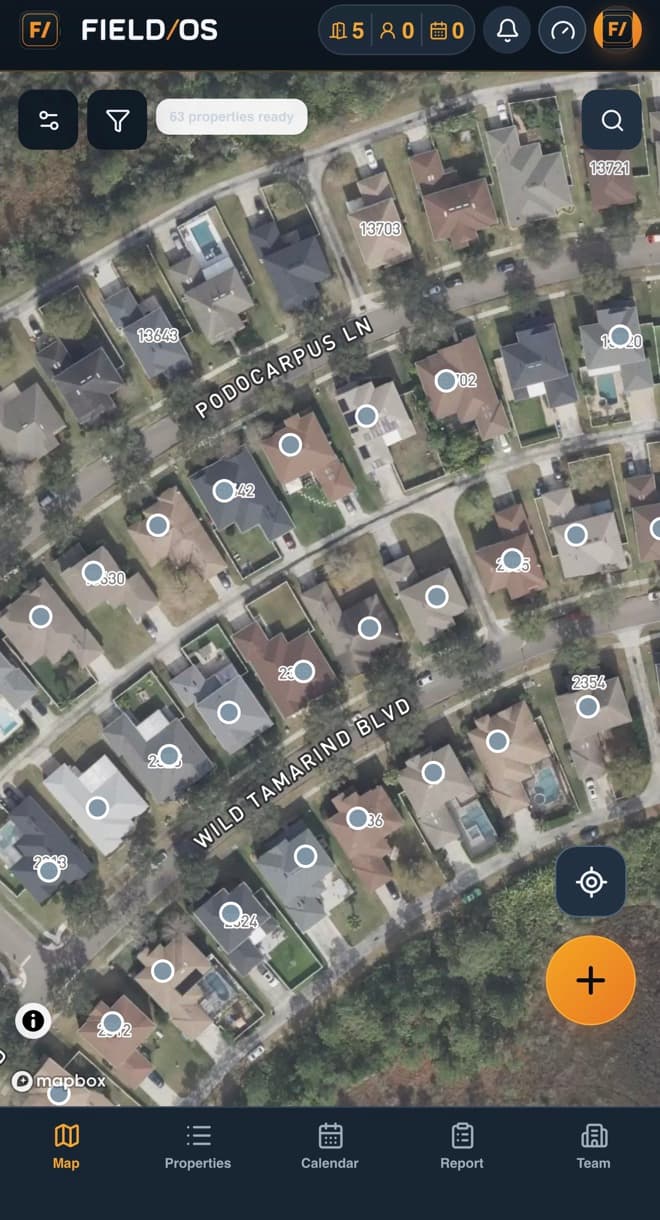
Property-ready map pins, live location, public-record context, and stable disposition colors keep teams moving door to door.
Field OS connects the territory, property, rep, appointment, closer, and outcome for 14 field-sales industries—with exclusive Solar and Roofing intelligence when your company needs it.
Every part of Field OS is designed around fast, accountable work in the field.
Property-ready map pins, live location, public-record context, and stable disposition colors keep teams moving door to door.
Carry the homeowner, appointment, setter credit, notes, photos, bills, and documents from the first conversation to the sales appointment.
See closer schedules, one-time conflicts, and a protected 30-minute travel buffer before assigning the appointment.
Track doors, contacts, appointments, documentation, outreach, sits, outcomes, conversion rates, and setter-to-closer performance.
Sunlight, Balanced, and Battery Saver modes preserve readability and are designed to preserve up to 40% more battery in supported work conditions.*
Company boundaries, role-based access, audit histories, secure files, scoped exports, and server-side permissions protect operational data.
* Battery improvement is an operating target, not a guarantee. Actual results vary by device, screen brightness, map use, location services, network conditions, and work pattern.
Choose an area to see how Field OS connects daily field activity to dispatch, close rates, and company intelligence.
Field OS keeps the next action, property context, and today’s production visible while the team is moving.
Work residential and commercial properties from stable building-level pins with homeowner or owner context when public records are available.
See doors, contacts, and appointments from the main map without interrupting the route.
Combine date, disposition, appointment outcome, user, and hierarchy filters to isolate exactly what needs attention.
Multiple reps can work the same property while the company retains each visit, user, time, and outcome.
Keep Prospecting Status separate from Signed and Installed customer milestones without creating a second property record.
Sunlight, Balanced, and Battery Saver modes adapt contrast and rendering to the environment and the workday.
Relate map time and time elsewhere in Field OS to doors, conversations, appointments, and outcomes.
Select one or multiple industries during signup or in Company Settings. Every team receives the complete Field OS workflow, while specialized tools stay visible only to eligible companies.
When Solar Energy is selected for the company, Field OS reveals solar-specific actions without adding clutter for every other team.
Identify the likely serving utility at the property and preserve user-confirmed utility evidence from an electric bill.
Turn utility areas on or off, filter the map by provider, and keep every property dot available for prospecting.
Launch the complete property address into Google Project Sunroof to review available solar-potential context.
Utility identification and territory coverage are evidence-based estimates. Florida is the current utility-intelligence rollout area, and field-confirmed bills can improve the operating record.
Choose multiple industries now and change them later with authorized company access.
Setters keep their credit. Closers get what they need. Leaders see the entire result.
Open a property-ready building pin or drop one manually.
Save the disposition, contact details, notes, photos, or documents.
The setter receives credit and the appointment enters dispatch.
Sales leadership checks availability and sends the full handoff.
The closer records the sit and outcome; reports update automatically.
Company data stays inside the company. Each role sees the work it needs—from a canvasser’s own doors to a Sales Director’s company-wide dispatch board.
Company AdminCompany, users, billing, and integrations
Sales DirectorDispatch, closer capacity, and sales performance
CloserAssigned appointments, files, sits, outcomes, and canvassing
Canvass LeaderTeam doors, contacts, and setter results
CanvasserFast property, contact, and appointment capture
Field OS is designed around the whole operating chain: property, rep, appointment, dispatch, documentation, closer, outcome, and follow-up intelligence.
Lower than the publicly listed RepCard Pro and SalesRabbit Pro prices reviewed for comparable team/API capability.
Field OS combines the workflows teams touch every day with the safeguards, synchronization, and recovery systems they should never have to think about.
These systems run behind the interface to keep daily field activity secure, synchronized, and recoverable.
Production health, login, PWA, and protected job queues are checked automatically.
Company scope, role permissions, history, and synchronization rules are enforced server-side.
Idempotency and stable CRM identity prevent duplicate exports, messages, and customer records.
Export scope is revalidated, sensitive formulas are neutralized, and the request is audited.
| Capability | FIELD/OS Included core stack | RepCard Public team plans | SalesRabbit Public paid plans | SPOTIO Public plan details |
|---|---|---|---|---|
| Price & trialComparable team / API tier | $39 Per active paid user/month; one all-inclusive card price | $49 Pro tier publicly listed per user/month | $75 Pro tier publicly listed per user/month, billed monthly | Custom quote No public per-user price |
| Price & trialTeam trial path | 15 days included Company admin can begin onboarding without a charge today | Personal free plan Team plans are presented through a sales/demo path | No paid-plan trial A limited single-user Lite option is available | Demo / qualified pilot No standard free trial is publicly offered |
| Price & trialPricing clarity | One active-seat plan Core workflow, billing, exports, API foundation, and reporting in one price | Tiered + add-ons Some messaging and document capabilities are separately priced | Tiered + add-ons Weather, data, contracts, and implementation can add cost | Configured quote Pricing and implementation vary by requirements |
| Field workflowOutdoor display and battery modes | Purpose-built Three display modes designed to preserve up to 40% more battery in supported conditions* | Not publicly specified No comparable multi-mode field display claim in reviewed materials | Not publicly specified No comparable multi-mode field display claim in reviewed materials | Not publicly specified No comparable multi-mode field display claim in reviewed materials |
| Field workflowProperty-first map context | Residential + commercial Building-level pins, repeat visits, owner context, dispositions, and live KPIs | Canvassing maps Map pins, routes, outcomes, and field activity | Lead and territory maps Historical activity, territories, status filters, and customer locator | Territory and route maps Location verification, routing, prospecting, and activity capture |
| Field workflowIndustry-exclusive property intelligence | Solar + Roofing toolkits Utility territories and Project Sunroof for eligible Solar companies; NOAA storm activity and property screening for eligible Roofing companies | Industry workflows Reviewed materials emphasize configurable canvassing, identity, and follow-up tools | Data and weather add-ons Property data and weather capabilities are available through separately packaged products | Configurable field platform Industry-specific workflows depend on customer configuration |
| Field workflowHomeowner / property-owner context | Connected to the property Public-record context where county data is available | Not publicly specified Reviewed materials emphasize contacts and canvassing | Available through DataGrid AI Buyer and property intelligence is priced as an add-on | Prospecting data Location-based B2B/B2C prospecting is advertised |
| Field workflowLive map scorecard and combined filters | Always visible Doors, contacts, appointments plus date, disposition, and outcome filters | Activity visibility Canvassing and outcome tools are advertised | Maps + status filters Filtering and reporting are advertised | Colorization + filtering Activity and territory filtering are advertised |
| Field workflowShared property with individual visit history | One address, every rep outcome Multiple users can work the same property without duplicating the parcel or losing individual attribution | Territory conflict controls Avoiding duplicate knocks is emphasized; comparable multi-rep visit history is not publicly detailed | Historical lead activity Lead history is advertised; canonical property plus independent rep engagements is not publicly specified | Visit audit activity Visit logging and audit history are advertised |
| Field workflowFast field continuity | Installable PWA + protected queues Home Screen install, cached app shell, queued property edits and attachments, conflict detection, and retry | Native mobile apps iOS and Android field access is advertised; comparable queued-write behavior is not publicly detailed | Mobile + web apps Mobile and web access are advertised; comparable queued-write behavior is not publicly detailed | Offline access Download My Day offline access is publicly listed for B2C plans |
| Field workflowField-speed property actions | Designed around the next door Manual pins, ready-property pins, current location, preferred navigation, instant calls, quick dispositions, and return-to-map flow | Canvassing + route tools Mapping, routing, lead capture, and follow-up are advertised | Canvassing + route planning Map leads, notes, appointments, reminders, and routes are included | Mobile field execution Territory, routing, activity, and prospect workflows are advertised |
| Dispatch & closeSetter-to-closer dispatch | Native operating queue Pending assignments, setter credit, closer dispatch, and both-user notifications | Scheduling + dispatch Team calendar, booking, dispatch, and routing are advertised | Scheduler on Pro Setter and closer scheduling is included in the listed Pro tier | Assignment workflows Lead, pipeline, and team workflow capabilities are advertised |
| Dispatch & closeAvailability and travel protection | Dispatch-aware Weekly windows, one-time blocks, conflicts, and a 30-minute commute buffer | Team calendar Comparable one-time block and travel-buffer behavior is not publicly specified | Setter / closer scheduler Comparable travel-buffer behavior is not publicly specified | Calendar integrations Comparable dispatch availability behavior is not publicly specified |
| Dispatch & closeFiles and context in the handoff | Included Property, contact, notes, bills, photos, files, setter, leader, and history | Document add-on Doc Engine is advertised as an additional monthly and usage charge | Lead attachments on Pro Lead file attachments are listed in Pro | Workflow dependent Public materials emphasize lead and activity management |
| Dispatch & closeSeparate field and closer outcomes | Included Property dispositions, appointment outcomes, required final notes, and explicit Sit/Pitched | Outcome workflows Canvassing and sales outcomes are advertised | Lead statuses Status, appointment, and reporting workflows are advertised | Custom activities and pipeline Activity and pipeline outcomes are advertised |
| Dispatch & closeAssignment notifications and calendar handoff | Setter and closer stay aligned Both users are notified after dispatch; Google Calendar can include the customer as a guest | Team calendar + dispatch Scheduling, appointment routing, and team communication are advertised | Scheduler on Pro Setter/closer collaboration and calendar integration are listed in Pro | Calendar integrations Google and Outlook calendar connections are advertised |
| Dispatch & closeInherited field-to-sales permissions | Six roles, one operating chain Company Admin and Sales Director inherit lower-role actions; Closer and Canvass Leader can also canvass | Admin and team controls Role-specific controls are advertised; the same inheritance model is not publicly specified | Hierarchy controls User and territory management are advertised; the same inheritance model is not publicly specified | Hierarchy + permissions Territory hierarchy and permission controls are advertised |
| ReportingField-to-close reporting | One measurement chain Doors → contacts → appointments → sits → outcomes → wins | Analytics + leaderboards Advanced reporting is listed in Pro | Dashboards + analytics Amplify reporting and performance tools are listed | Performance analytics Activity, territory, pipeline, and conversion reporting are listed |
| ReportingDocumentation and closer-quality metrics | Included Attachment rate, sits, close per sit, close per appointment, and setter–closer pairing | Not publicly specified The same documentation-to-close measurement chain is not described | Configurable reporting The same packaged measurement chain is not publicly specified | Configurable analytics The same packaged measurement chain is not publicly specified |
| ReportingWorkday context | Included Active app time, calls, texts, emails, weather, and hierarchy-aware leaderboards | Engagement + leaderboards Communication analytics and competition tools are emphasized | Leaderboards; weather add-on Weather is separately priced; productivity tools are available | Activity + leaderboards Performance and field activity reporting are advertised |
| ReportingHierarchy-safe exports | Built into the export request Company, leader, setter, closer, dates, dispositions, outcomes, validation, and audit | API on Pro Detailed export scope depends on configuration | Lead import / export Import, export, API, and integrations are advertised | Reports + integrations Export behavior depends on the configured plan and workflow |
| ReportingSetter, closer, and pairing performance | Built-in attribution Compare closers, canvassers, territories, sources, and setter–closer pairings with sales directors included as closers | Advanced analytics Rep and team reporting are listed in Pro; pairing-specific reporting is not publicly detailed | Amplify analytics Dashboards, reports, leaderboards, and scorecards are advertised | Performance analytics Activity, pipeline, territory, and team performance analytics are advertised |
| ReportingAppointment change timeline | Immutable operating history Assignment changes, reschedules, outcomes, notes, actor, and timestamp remain reviewable | Activity history Comparable immutable appointment-change history is not publicly specified | Lead history Historical activity is advertised; the same appointment audit chain is not publicly specified | Visit audit log Visit and activity audit capabilities are advertised |
| PlatformCommunication templates | Role-aware defaults Contact, appointment, and closer SMS/email templates aligned with company policy | Text + email campaigns Marketing and engagement tools are advertised | Messaging workflows Capabilities depend on selected applications and integrations | Engagement capabilities Packaging depends on the selected plan and add-ons |
| PlatformCalendar connection | Google Calendar Optional per-user connection with appointment details and customer guest | Team calendar Team scheduling is advertised | Setter / closer scheduler Scheduling is listed in Pro | Google + Outlook Calendar integrations are publicly listed |
| PlatformCRM and API delivery | Generic API + signed webhooks Prepared outbound adapters for HubSpot, Salesforce, Zoho, Pipedrive, and GoHighLevel | API on Pro Custom integrations are listed for Enterprise | API + integrations on Pro Direct and partner integrations are advertised | CRM integrations CRM and calendar connections are advertised |
| PlatformOperational audit and access | Six roles + immutable history Company isolation, backend permissions, visit history, assignment history, and outcome history | Admin and team controls Exact parity depends on the selected workflow | Hierarchy and user controls Access and team management tools are advertised | Territory hierarchy + permissions Role and territory controls are advertised |
| PlatformCompany policy at every contact point | Three template layers Contact, appointment, and closer SMS/email defaults support company policy plus approved personal customization | Messaging + campaigns Digital cards, messaging, and automated follow-up are advertised; SMS can carry usage pricing | Workflow dependent Messaging depth depends on selected applications and integrations | Engagement add-on Calling, texting, and automated follow-up are presented in the Engagement Bundle |
| PlatformActive-seat lifecycle and company billing | Native company controls Paid, complimentary, trial, inactive, and deleted states; active paid seats synchronize with Stripe | Team subscriptions Team plan billing and upgrades are advertised; comparable access-mode controls are not publicly specified | Seat billing Active users consume seats with plan-specific billing terms | User-based custom pricing User and territory scaling are advertised through a quoted plan |
| Always-on operationsServer-enforced company isolation | Defense in depth Every sensitive route rechecks company, role, hierarchy, active status, and database row-level security | Team access controls Security architecture at the same level is not publicly detailed | Encrypted + access limited Encryption and limited user access are publicly stated; advanced controls vary by tier | Enterprise security Role and permission capabilities are advertised; implementation detail is not public |
| Always-on operationsEncrypted connections and signed delivery | Secrets stay server-side OAuth tokens and webhook secrets are encrypted; API keys are hashed; outbound webhooks are cryptographically signed | Integrations advertised Comparable credential-storage and webhook-signing details are not publicly specified | API + integrations Available on higher plans; comparable implementation details are not publicly specified | CRM integrations Integration security details depend on the configured connection |
| Always-on operationsDuplicate-safe CRM synchronization | Stable identity + idempotency One-way delivery retains CRM object links and aliases so changed phone/email values do not create duplicate contacts | CRM integrations Contact delivery is advertised; comparable alias and retry safeguards are not publicly detailed | 60+ integrations + API Integration capabilities are listed on Pro; comparable duplicate controls are not publicly detailed | CRM synchronization CRM integrations and two-way sync are advertised; implementation varies by CRM |
| Always-on operationsDurable background delivery | Retry, recovery, dead-letter protection Exports, emails, CRM events, and billing events use durable queues with stale-job recovery and bounded retries | Not publicly specified Background delivery reliability architecture is not described in reviewed materials | Not publicly specified Background delivery reliability architecture is not described in reviewed materials | Not publicly specified Background delivery reliability architecture is not described in reviewed materials |
| Always-on operationsAutomated production watchdog | Checks every 15 minutes Production health, authentication, PWA assets, queue status, and terminal job failures are monitored with incident creation | Not publicly specified Comparable customer-visible monitoring detail is not published | Not publicly specified Comparable customer-visible monitoring detail is not published | Not publicly specified Comparable customer-visible monitoring detail is not published |
| Always-on operationsSecure attachments and exports | Short-lived access + audit Files and prepared exports use authorized, expiring links; export scope is revalidated and downloads are recorded | Documents + API Document and integration capabilities are advertised; comparable download controls are not publicly detailed | Attachments + export Lead attachments and data export are advertised on paid tiers | Data controls Reporting and integrations are advertised; exact file/export controls depend on configuration |
| Always-on operationsPayment-state integrity | Stripe remains source of truth Signed webhooks, idempotent event claims, grace-period access, seat reconciliation, and automatic restoration protect company access | Subscription billing Comparable internal payment-state safeguards are not publicly detailed | Seat billing Seat lifecycle and proration are publicly described; internal webhook controls are not | Quoted subscription Billing implementation depends on the customer agreement |
Comparison reflects publicly advertised product capabilities and pricing reviewed July 2026. Field OS entries include implemented user-facing and background operational capabilities; provider-dependent CRM and messaging features require configuration. It does not claim that platforms configure, package, or price every workflow identically. “Not publicly specified” means the reviewed public materials did not clearly describe a comparable capability—it does not mean the capability is absent. RepCard, SalesRabbit, and SPOTIO are trademarks of their respective owners. No competitor links are presented on this page.
Use the company-scoped API and signed webhooks. Prepared one-way outbound adapters support HubSpot, Salesforce, Zoho, Pipedrive, and GoHighLevel as each company connection is enabled.
No separate Stripe or card-processing surcharge is added to the advertised plan price.
USD / active paid user / month
after your 15-day free trialStart free trialCard required. No charge today. Cancel before the trial ends to avoid the first charge.
Select your industries and operating states, create the company, and invite the team into one connected field operation.
Start 15 days free